WFS inventory differences: compare stock states and timestamps first
SW
SinoWarehousing Ops Team China warehouse operations
Updated Oct 12, 2026
3 min read
TL;DR · 30 seconds
Choose the relevant WFS report and compare the same item, stock state and observation time before investigating an inventory difference.
OPERATING NOTES · 6 OCTOBER 2026
WFS inventory differences: compare stock states and timestamps first
Two WFS screens can show different quantities without describing the same thing. Before changing a shipment plan or treating the difference as a loss, identify the item, report, state and time represented by each number. Then keep the China dispatch and destination receiving records alongside that comparison.
Prepared by SinoWarehousing · Workflow proposals with linked platform guidance.
Choose the report for the question
Walmart’s fulfillment-report overview describes several WFS reports. Inventory reconciliation covers adjustments, discrepancies and warehouse movements. Orders covers fulfillment and shipment activity. Customer returns concerns returned orders and reasons, while settlement concerns financial activity.
Name the report in your working record instead of treating every export as an inventory count. Keep the selected fulfillment method and any report filters with the file. A seller-fulfilled view and a WFS view answer different questions.
Keep the item identifiers together
Retain the seller SKU, item ID, product variant and identifier shown in the report. Confirm they refer to the same product before comparing quantities. Where an export uses a different identifier format, ask the seller to provide the mapping rather than matching rows by a similar product name.
Use the physical SKU and carton mapping to connect the China dispatch record to that item. A total carton count cannot replace the item-level unit record when several variants share a shipment.
Compare the state, not just the number
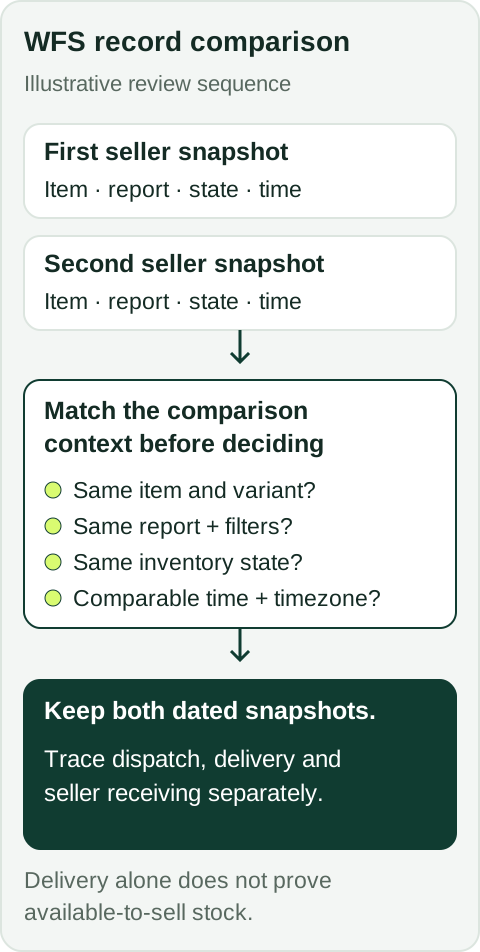
Illustrative record review, not a seller-account screen. Compare item and variant, report and filters, exact inventory state, and time with timezone. Retain both dated snapshots, then trace dispatch, delivery and seller receiving separately. A delivery event does not establish available-to-sell stock.
The WFS inventory health guide distinguishes available, reserved and inbound units, as well as movement and review states. Units already reserved for customer orders are excluded from available units. Inbound units have been sent but not yet received. Keep the field label attached to the quantity.
Comparison field
Record with the quantity
Item
Seller SKU, item ID, variant and identifier mapping
Source
Report or screen name and selected filters
State
Exact inventory field label shown in the account
Time
Export time or observation time, with timezone
Shipment
Inbound order and matching carton or batch references
Do not treat these selected states as a complete balancing formula for every report. Review the definitions and the seller’s actual record before combining quantities.
Allow for different observation times
Walmart’s inventory health guidance says its available-to-sell quantity updates less frequently than the Inventory page. Keep both observation times when comparing those sources. A later screen may reflect events that were absent from the earlier export.
Illustrative example: a saved report shows 48 available units at 10:00, while the seller records 52 on the Inventory page at 12:00. Retain both snapshots and the intervening account events. The four-unit difference alone does not identify an adjustment, receipt or missing shipment.
Find the stage that needs follow-up
Compare approved China dispatch units, carrier handover, available delivery evidence and the seller’s receiving quantities as separate stages. Record where the same item’s quantities first differ and what remains unknown. A carrier delivery event does not establish the units accepted or available to sell.
Prepare the matching references for the seller to review through the current WFS support process. Preserve later corrections alongside the original export. For a SinoWarehousing handover, agree the physical count and evidence scope before preparation or dispatch; destination acceptance remains shipment-specific.
Sources and scope
Sources checked 6 October 2026. Recheck the seller’s current program and account instructions before acting.
This article uses US WFS reporting guidance checked on 6 October 2026. The comparison record and examples are editorial proposals. They do not diagnose an account issue or establish investigation eligibility, deadlines or reimbursement.
Share the product, quantity, current location, destination and requested work. Product acceptance, receiving address, handling scope and charges need confirmation for the actual shipment.